
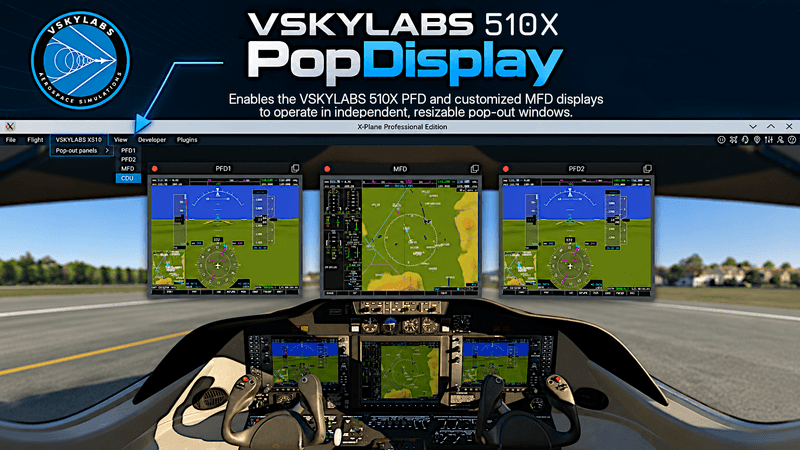
VSKYLABS PopDisplay-510X
Version: v1.0 – Early Access
VSKYLABS PopDisplay™ - 510X VLJ Edition for X-Plane 12.
VSKYLABS PopDisplay is a free, optional enhancement designed specifically for the VSKYLABS 510X VLJ, providing greater flexibility in cockpit display configuration.
MAIN FEATURES:
- Independent, resizable PFD1, PFD2 and MFD windows.
- Multi-monitor and home cockpit integration.
- Automatic window position and size memory.
- Windows and Linux compatibility.
- Self-contained native X-Plane plugin.
- Simple installation and removal.
INSTALLATION:
- Close X-Plane.
- Extract the downloaded ZIP.
- Copy the PopDisplay folder into the VSKYLABS 510X VLJ aircraft's plugins folder.
- Start X-Plane and load the aircraft.
Do not install PopDisplay in X-Plane's global Resources/plugins folder.
USAGE:
- Access the Pop-out panels submenu from X-Plane's Aircraft menu.
- Select PFD1, PFD2 or MFD to show or hide the corresponding display.
- Resize, detach and position the display windows as desired.
- Window positions, dimensions and popup/popout modes are remembered automatically.
- Previously visible displays are automatically restored following an aircraft reload within the same X-Plane session: wait up to 5 seconds to allow auto-initialization.
- When starting a new X-Plane session, open the desired displays manually. Their last saved positions will be recalled.
- Use Reset positions to restore the default window positions.
- The CDU menu item activates X-Plane's native CDU window.
COMPATIBILITY:
- Tested with X-Plane 12.4.4.
- Windows 64-bit.
- Linux 64-bit (Ubuntu 24.04 LTS or compatible distributions).
- macOS is not currently supported.
- No additional plugins or runtimes are required.
IMPORTANT:
- The VSKYLABS 510X VLJ aircraft is required and is not included in this download.
- This is an Early Access release. Unexpected behavior may occur.
- Pop-out window positioning may be subject to operating system, window manager and X-Plane limitations.
- Future X-Plane updates may affect PopDisplay functionality.
- PopDisplay is entirely optional and can be removed without affecting normal aircraft operation.
- Installation and use are subject to the accompanying VSKYLABS Home Use License.
- README and license documents are included in the download package. Please read them before installation.
© VSKYLABS Aerospace Simulations